Save locations and path variables
Edit save locations
- Open a game and click View managed files.
- Select a device, then edit save locations or add entries.
- Click Save.
Files, folders, and Windows registry entries are supported. Enable Delete before overwrite when you want a folder cleared before its contents are restored.
Use path variables
Type < in a path field and choose a suggested variable. The field shows the resolved path on this device.
For example, <home>/Saved Games/MyGame uses the current user's home folder.
Detected dynamic paths match files on the current device. Configure game libraries in Settings → Auto Scan. Set a game's installation directory while adding it or in View managed files.
Choosing between game libraries
<root> is a game library root. The relative path after it is appended as written. For a game at H:\Dying Light\DyingLightGame.exe with library root H:\, use <root>/Dying Light/DyingLightGame.exe as the launch path.
When several locations are available, select the library in the add or import dialog. For an existing game, use View managed files → Game root directory. A single candidate is used automatically. File existence does not decide which library to use.
Each game configuration manages one installation and account instance per device, with as many save entries as needed. Choose one library or account when several candidates are available. Add separate games to manage separate instances. Other devices can bind their own locations and accounts.
Game installation directory supplies <base>. If the directory is D:/Games/MyGame, a save path can be <base>/Saves/*.sav. Change the installation directory after moving the game; backup and restore then use the new location. Choose a detected directory, use the folder picker, or type it yourself. Manually added games work the same way.
Game library roots help discover games; they do not mean backing up every library. Game store accounts supply candidates for <storeUserId>, and a choice is needed only when a save path references that variable. Custom account variables are resolved from their own configured values.
View the resolved path below the input or hover over its status dot. If it says “Select a location”, choose one first. If the file does not exist, check the path or run the game to create a save before backing up. You can also pick the actual file or folder directly.
Device paths
If a device stores saves outside the original dynamic pattern, set an override:
- Open View managed files and select the device.
- Turn on Override path on this device on the dynamic save entry and enter its actual path.
- Click save. To revert, turn off Override path on this device and save again.
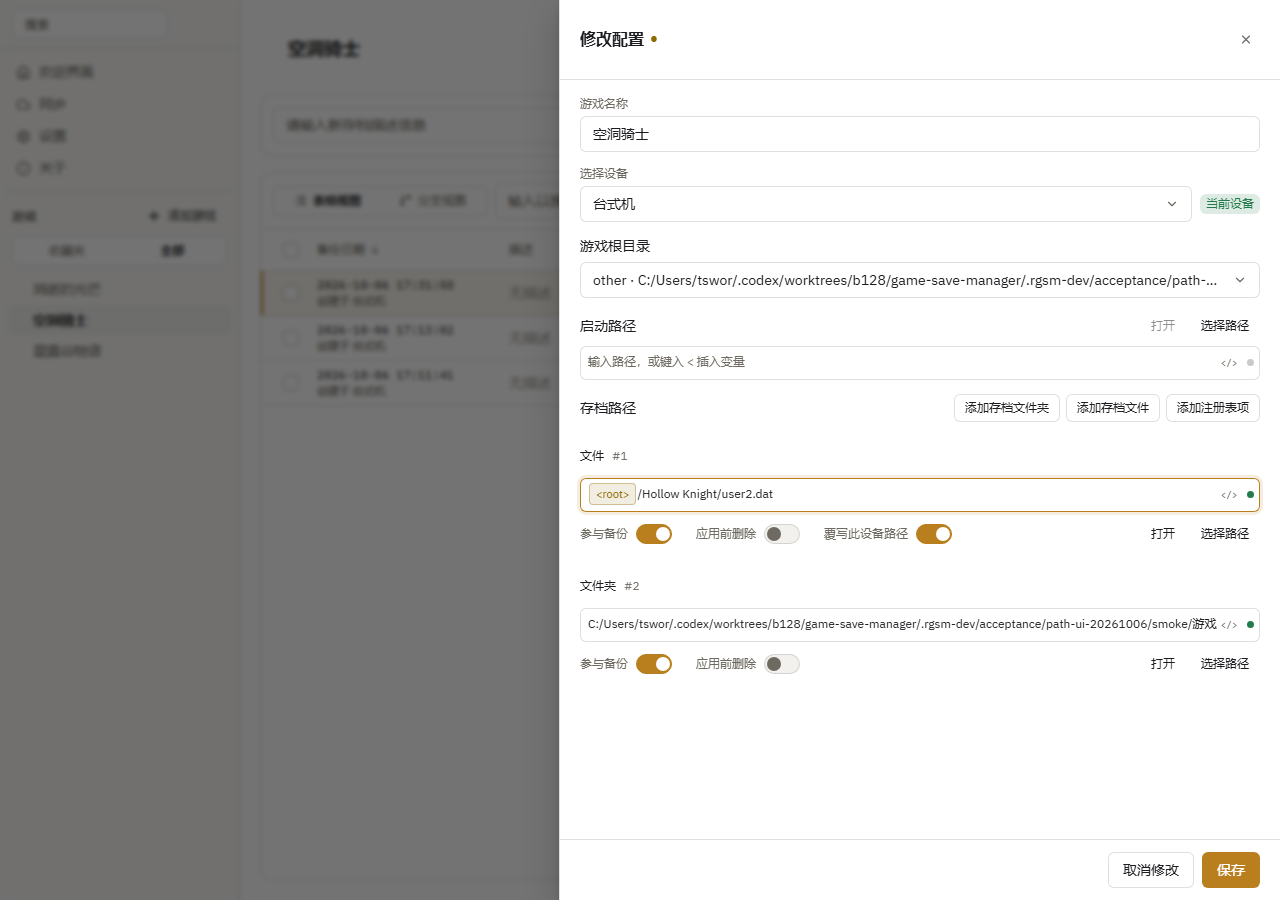
The override affects only the selected device and preserves the original pattern. Backup, restore, and automatic backup use the override. A missing override causes backup to fail without falling back to another location; restoring can create a missing target.
An override changes only the path, preserving the file or folder type. Multiple captured locations for one save entry cannot be merged into a single override location.
Name your devices in Settings → Device Management. To reuse another device's paths, click its Import Paths action. Confirming replaces the corresponding path settings on this device.
Typed paths, globs, and device variables
Add save file / folder appends an editable row. Use Choose path on its right to open a picker. Typed paths, dynamic paths, and device overrides share the same expression syntax.
A glob such as <base>/Saves/*.sav captures every matching save file within the instance and preserves relative locations. It does not identify different account directories as the same logical save. Opening a glob opens its containing root.
Configure Path variables while adding or editing a game, then reference them as <var:name>, for example <var:saveRoot>/MyGame/<var:account>/*.sav.
- Editing a value changes only this game on the current device. Each field shows its value source.
- Choose Edit device variable… from the variable's ⋯ menu to review affected games and edit the shared value. Existing game overrides are preserved.
- Use device variable clears a game override; Discard default change discards only the pending shared edit.
- Cancel discards edits; Save persists the variables and game together.
Set the same variable names to the appropriate values on another device. Restore uses the target device's values while retaining distinct glob matches. Values are literal text or paths; nested variables and scripts are unsupported, and glob characters inside values are treated literally. Referenced variables must have values.
Variables can appear after a glob. New backups record the path relationships needed for relocation. If an older backup lacks that information, directory names are not automatically interpreted as variables.
Choose Insert variable beside a path to select a variable or create and insert one by name and value. You do not need to type var:. Device variables are shared on this device; game variables apply only to this game on this device. If another device lacks a value, choose Set up variables on the game page. Backup and restore also open setup when needed: Save and continue resumes the requested operation, while closing cancels it.
Choose Find local location beside a variable to search for values matching the save path. Selecting a result updates only this game’s draft; save the game to apply it. Confirm the candidate even when only one is found. Configure other missing variables, such as the root directory, first. If no location matches, enter a value manually. Search is bounded, reports incomplete results, and does not follow symbolic links.